Skip to content

Service reminders without typing your mileage

Car Care: Maintenance Tracker is a free car maintenance app for iPhone that keeps your service reminders on time by counting your car's miles as you drive. With trip detection on, each drive adds its distance to the car's odometer, and the reminders for oil, brakes and tires count down from the miles the car has really driven.

The countdown starts at the last service

Each maintenance item counts from the last time the work was done. Log that visit with its date and mileage in the car's service history, or let a scan of the receipt fill it in for you. An oil change logged in the spring gives the next one a date and a distance to go, in miles or kilometers as you choose.

Every drive adds to the odometer

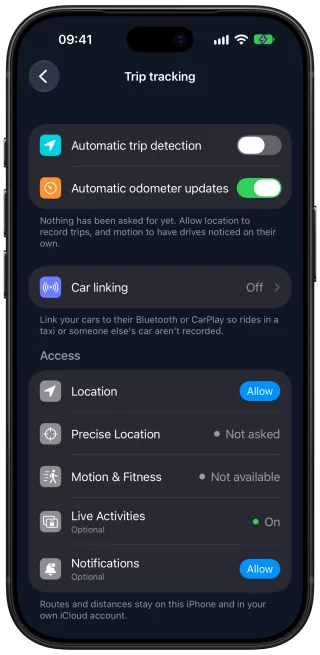
Turn on trip detection, and Car Care records each drive automatically, with the route, the distance and the driving time. When the drive ends, its distance goes onto the odometer, so the reminders count against the car's current mileage. Every recorded drive stays in a trip log with its route on a map.

Trip detection is off until you turn it on. It uses your location, including in the background, to record your drives. Routes stay on your iPhone and in your private iCloud, and are never sent to our servers.

With two cars, link each one to its Bluetooth or CarPlay, and every drive is saved to the car you were driving. Each car you add keeps its own maintenance, trips and costs, so its reminders follow its own mileage.

The reminder arrives when the miles are driven

As the odometer climbs, each maintenance item moves from up to date to due soon, and shows the miles and days remaining. A notification arrives as an item becomes due soon, and another once it is due. Each item falls due at the mileage or the date, whichever comes first, so a car parked for the winter still gets its oil change reminder on time.

Log the oil change once it is done, and the next countdown starts from that visit.

The Car Care Trip tracking settings screen with switches for automatic trip detection and automatic odometer updates, a car linking row and the location, motion and notification permissions.

Questions and answers

How does Car Care know how far my car has driven?

You enter the car's mileage once, when you add the car. With trip detection on, your iPhone then records each drive, and Car Care adds its distance to that reading, so the mileage grows with every trip and your reminders count from it.

Do the reminders work if I leave trip detection off?

Yes. The odometer reading you enter with a fill-up and the mileage of a service you log keep the car's mileage current too, and you can correct the reading by hand at any time. Trip detection adds the miles in between without any typing.

Will a taxi ride count toward my car's mileage?

Once your car is linked to its Bluetooth or CarPlay, a taxi ride or a drive in a friend's car is not logged as a trip, because Car Care records only the drives in your own cars and saves each one to the car you drove.

Get Car Care: Maintenance Tracker on the App Store

Download on the App Store

Free on iPhone, with every feature included, no subscription and no account to create.