 Car Care
Your car records stay on your iPhone
Car Care: Maintenance Tracker is a free car maintenance app for iPhone with no account to create. Your service records, fill-ups and trips stay on your iPhone and sync through your own private iCloud. Car Care works offline, and it does not track you across other apps or websites.
On your iPhone and in your own private iCloud
Everything you log in Car Care is saved on your iPhone first: each service with its receipts, each fill-up, each trip. When iCloud is on for your iPhone, Car Care syncs your records through your own private iCloud. Sync follows your iPhone's iCloud setting, so there is nothing to set up inside Car Care.
At a station with no signal, a fill-up you log is saved on your iPhone at once, and your reminders count from its odometer reading right away.
Back up all your data to a file
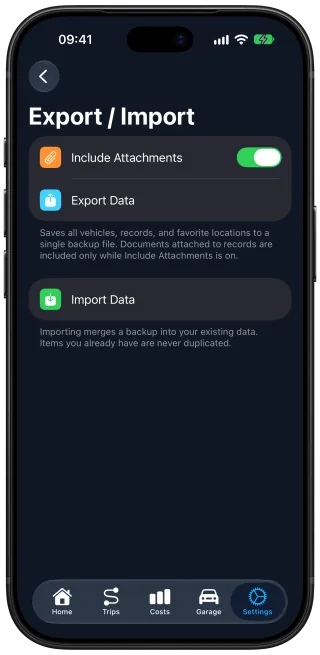
Export all your data to a backup file and import it again whenever you need it. The backup holds every car, with all its records and trips, and you decide whether the attachments go in too.
What happens to your routes and the receipts you scan
Trip detection is off until you turn it on. When it records your drives, the trip routes stay on your iPhone and in your private iCloud, and are never sent to our servers.
A scan sends the receipt or invoice you choose to an EU-based AI service to be read, and the document is never used to train AI models. Car Care counts your monthly scans without your name, email or Apple ID.
Your data and the privacy policy
Car Care does not track you across other apps or websites, and it does not sell your data. The privacy policy gives the legal detail, including which services process a scan, how long anything is kept and how to have your data deleted.
Questions and answers
Do I need an account to use Car Care?
No. You start using Car Care without creating an account. Your records stay on your iPhone and sync through your own private iCloud, following your iPhone's iCloud setting.
Does Car Care work offline?
Yes. Car Care works without a connection, so you can log a service or a fill-up wherever you are. Only a scan and iCloud sync need one.
What does a Car Care backup include?
A backup holds every car you have added, with its service records, fill-ups and trips, and the receipt photos and PDFs attached to them if you choose to include them. Importing that one file brings all of it back.
Does Car Care record where I drive?
Only after you turn on trip detection, which is off by default. Car Care then records the route, distance and driving time of each drive, so your car's mileage stays current without typing it in. The routes stay on your iPhone and in your private iCloud and are never sent to our servers.
What happens to a receipt I scan?
Car Care sends the receipt or invoice you choose to an EU-based AI service to be read, and the document is never used to train AI models. The scan becomes a service record, and the scanned copy stays with it on your iPhone and in your private iCloud.
Get Car Care: Maintenance Tracker on the App Store

Free on iPhone, with every feature included, no subscription and no account to create.