Skip to content

From a paper service book or spreadsheet to an app

Car Care: Maintenance Tracker, a free car maintenance app for iPhone, turns your paper service book or spreadsheet into a digital service book that reminds you when service is due. Add your past services, each with its own date and mileage, and the latest one of each item starts its reminder. From then on, the history and the reminders keep going without the book.

Start with the car and its mileage today

Add the car with the reading on its odometer today, in miles or kilometers, as you choose. Car Care gives it a list of maintenance items, from engine oil to the timing belt, each starting from a recommended interval. Your service book shows when each one was last done, and that is what you add next.

Add the most recent service of each item first

Begin with the latest entry for each item, because that record starts the item's reminder, with the miles and days left. If the book's last pages show a transmission fluid change last spring and a new timing belt the year before, add those two visits, and both reminders count from them.

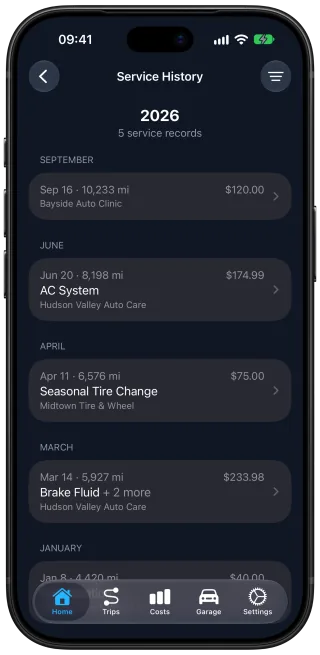
Add past services one at a time, each as a record of its own with the date and mileage from the book. The service history keeps every job with its price. From a spreadsheet, each row goes in as one typed service.

Entering every older service is optional. Each one you add later fills in the history and the car's costs for the month and year it happened.

Scan the old receipts instead of typing them

You can scan a page of the service book, or a receipt or invoice kept with it, printed or handwritten. Take a clear photo or attach the PDF, and a scan fills in the service record with each job and its price. You check the record before it is saved, and the photo or PDF stays attached to it.

A used car with the seller's paperwork

If the car came with a folder of invoices from the seller, add the car at the mileage it shows now, then scan or type in the invoices. The reminders count from the work they show.

From here on, trips keep the reminders current

Once the latest services are in, the paper book can go back in the drawer. Your records stay on your iPhone and sync through your own private iCloud. Turn on trip detection, and each drive adds its distance to the odometer, so your reminders stay on time without typing in the mileage.

The Car Care Service History screen listing the 2026 service records by month, each with its date, mileage, price and service center.

Questions and answers

Do I need to enter my car's whole service history?

No. Each maintenance item counts from its latest service, so one record per item is enough to start the reminders. Older services add the earlier years to the history and to the car's costs, and they can go in whenever you have time.

Can I scan a whole folder of old receipts?

Yes, over a few months if the folder is thick. Car Care includes 10 free scans every month, and there are no paid scans. Scan the most recent receipts first, since they start the reminders. Records you type in yourself are unlimited, and attaching a receipt to a record without scanning it uses none of your scans.

Should I switch from my spreadsheet or paper logbook to an app?

An app is worth the switch if you want to be told when service is due, and a paper logbook or a spreadsheet is enough if a record is all you want. A paper logbook stays with the car, and a spreadsheet can be printed or sent as a file. Once the latest service of each item is in, Car Care: Maintenance Tracker on your iPhone tells you when the next one is due, by mileage or by time, and recorded trips keep the mileage current without typing. Receipts stay with their service records and sync through your own private iCloud. A side-by-side comparison weighs where each one is the better choice.

Get Car Care: Maintenance Tracker on the App Store

Download on the App Store

Free on iPhone, with every feature included, no subscription and no account to create.