 Car Care
Scan your mechanic's receipt into a service record
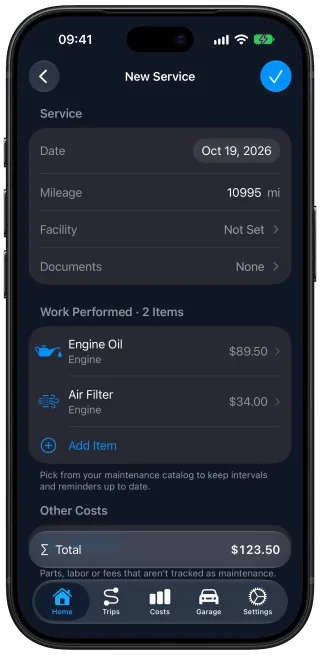
Car Care: Maintenance Tracker is a free car maintenance app for iPhone that logs a service from the receipt your mechanic gave you. Take a photo of the receipt or invoice, printed or handwritten, or attach the PDF. Car Care reads the date, the mileage, the service center, every job with its price, and the total, and fills in one service record for you.
Scan a service receipt instead of typing it
An oil change and new brake pads on one receipt land in the same record, each with its own price, and both start their next reminders right away.
You review every scanned record and correct anything before it is saved. The receipt itself stays attached to the record.
Scan older receipts to fill in the car's history
Scan the receipts that have piled up in the glove box over the last few years, one at a time, and each one becomes a service record with the date and mileage from that receipt. Your service history fills in with every job and what it cost, and your maintenance reminders count from the latest service.
How many scans are included
Scanning is part of the free app: Car Care includes 10 free scans every month, and there are no paid scans. When the 10 are used, scanning returns at the start of the next month. Records you type in yourself are unlimited, and attaching a receipt to a record without scanning it uses none of your scans.
What happens to the receipt you scan
A scan sends the receipt or invoice you choose to an EU-based AI service to be read, and the document is never used to train AI models. Car Care counts your monthly scans without your name, email or Apple ID. The scanned copy then stays with its service record on your iPhone and in your own private iCloud, where Car Care keeps all your records.
Questions and answers
What kinds of receipts can Car Care scan?
Car Care reads a receipt or invoice from your mechanic, printed or handwritten, from a photo you take with your iPhone or from a PDF. An invoice that came by email can be added as its PDF, or as a screenshot, which Car Care reads like a photo. A page of a paper service book can be scanned the same way.
What if the scan reads something wrong?
You see the filled-in service record before it is saved and can correct anything on it.
Does a scanned receipt update my maintenance reminders?
Yes. When Car Care recognizes work on the receipt, such as an oil change, that item's next reminder counts from the date and mileage of the visit. The prices on the record also count toward the car's costs, so one visit updates the reminders, the history and the costs together.
Is receipt scanning free?
Yes. Car Care includes 10 free scans every month, and there are no paid scans. A receipt beyond the 10 can wait for next month's scans, or you can type it in and attach the photo, which uses no scan.
Does receipt scanning work for an electric or hybrid car?
Yes. Scanning works the same for every car, and the work Car Care recognizes on the receipt is matched to that car's own maintenance items.
Get Car Care: Maintenance Tracker on the App Store

Free on iPhone, with every feature included, no subscription and no account to create.