 Car Care
A fuel log that shows your car's MPG
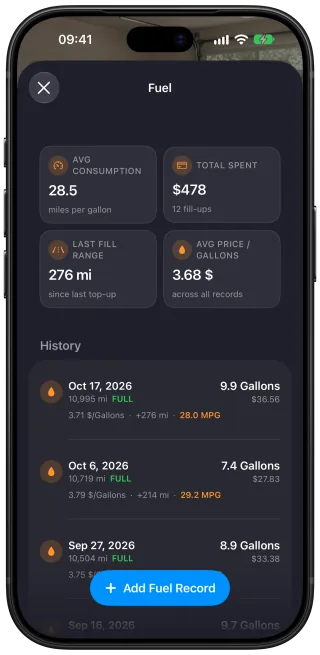
Car Care: Maintenance Tracker, a free iPhone app, keeps a fuel log for your car. Enter each fill-up with the gallons or liters, the price and the odometer reading. Car Care shows your fuel economy in MPG or L/100 km, how much you have spent on fuel and the average price you paid.
Log a fill-up with the fuel, the price and the mileage
A fill-up takes three numbers from the pump and the dashboard: how much fuel went in, what you paid for it and the odometer reading. Fuel economy is calculated from full tanks, so a fill-up that stops short goes in as a partial one. Its price still counts toward your fuel spending.
The odometer reading you enter keeps the car's mileage current, so your mileage reminders stay accurate between services.
Your fuel economy, tank by tank
Car Care measures each full tank by the distance driven since the last one and the fuel it took to fill up again. Drive 360 miles after a full tank, refill it with 12 gallons, and that tank comes out at 30 MPG. Car Care keeps an average across all your full tanks.
Fuel economy follows your distance setting. Choose miles and it shows in MPG, or choose kilometers and it shows in L/100 km.
What you spend on fuel
The fuel log adds up what you have paid for every fill-up and works out the average price per gallon or liter. Each fill-up also goes into the car's costs per month, per year and overall, beside what its services cost.
A fuel log for each car
If there are two cars at home, each keeps its own fill-ups, fuel economy and spending. The SUV's fill-ups stay out of the hatchback's MPG.
Questions and answers
How do I track my car's MPG?
Log each fill-up in Car Care: Maintenance Tracker on your iPhone with the gallons or liters, the price and the odometer reading. From the second full tank on, Car Care shows the fuel economy of each tank in MPG or L/100 km and keeps an average. It also adds up what you spend on fuel.
Can I log a fill-up when I don't fill the tank all the way?
Yes. Log it as a partial fill-up. Its price still counts toward your fuel spending and the average fuel price, while your fuel economy comes from the full tanks.
When does Car Care first show my fuel economy?
Car Care shows your fuel economy after your second full tank. The first full tank sets the starting point for measuring the next one.
Can Car Care show fuel economy in L/100 km instead of MPG?
Yes. Choose kilometers and fuel economy shows in L/100 km. Fuel volume is a separate setting, so you can still log fill-ups in liters or in gallons, whichever your pump shows.
Do fill-ups update my car's mileage?
Yes. The odometer reading you enter with a fill-up keeps the car's mileage current, and your maintenance reminders count from that mileage. With trip detection on, each recorded drive adds its distance between fill-ups.
Does fuel count toward my car's total costs?
Yes. Each fill-up's price is added to the car's costs, where you can see fuel and maintenance side by side for any month or year. Together with service jobs and renewals, your fill-ups make up what the car costs to run.
Can I keep a fuel log for two cars?
Yes. In Car Care, each car has its own fuel log, with its own fill-ups, fuel economy and spending, so one car's figures stay out of the other's.
Get Car Care: Maintenance Tracker on the App Store

Free on iPhone, with every feature included, no subscription and no account to create.