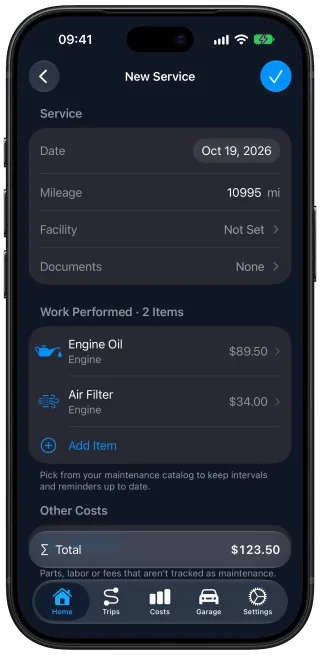
One receipt updates the car's history and reminders
Car Care: Maintenance Tracker, a free car maintenance app for iPhone, keeps your car's history,
reminders and costs up to date after a service visit. Back from the service center, scan the
receipt or type it in, and it becomes one service record. The work done restarts its reminders,
the prices count toward the car's costs, and Car Care offers to bring the odometer up to the
mileage of the visit.
The receipt becomes one service record
The shop replaced the spark plugs and the battery, and charged for an hour of labor. Take a photo
of the receipt or attach the PDF, and a scan reads the date, the
mileage, the service center and every job with its price. A service you type in yourself works
the same way.
Each job keeps its own price. Anything the scan does not match to a maintenance item, such as the
labor, stays on the record as a cost line, and the record adds up to the total you paid. You
review the scanned record and correct anything before it is saved. The receipt stays attached, so
the car's service history keeps the visit with its paperwork.
The work done starts its next reminders
Each job Car Care recognizes, such as the spark plugs, counts from the date and mileage of the
visit. The next replacement now has a distance to go and a date, and
the reminder comes at whichever the car reaches first.
Items the shop did not touch keep counting from their own last service.
The prices count toward the car's costs
Every price on the record joins the car's costs for the month of the visit,
under its maintenance category, without a second entry. Next to the fill-ups and renewals, the
visit becomes part of what the car costs to run.
The odometer catches up with the visit
The receipt also shows the mileage the car had at the shop. If that is higher than the odometer
in the app, Car Care offers to bring the odometer up to it, so the miles left on every item
match where the car really is. From there, trip detection
adds each drive to the odometer, so the mileage keeps up without typing.
 Car Care