 Car Care
An automatic trip log for your car
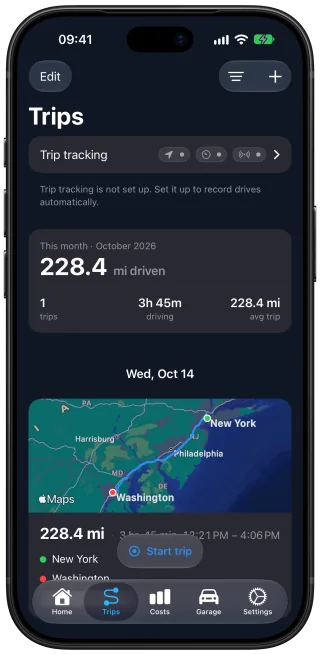
Car Care: Maintenance Tracker, a free iPhone app, keeps a trip log for your car. Turn on trip detection and Car Care records each drive: the route on a map, the distance and the driving time. Each recorded trip adds its distance to the odometer, so your service reminders stay accurate without typing in the mileage.
Trips that record themselves, or that you start yourself
With trip detection on, your iPhone notices when a drive begins and Car Care starts recording. When the car stops moving, the trip ends and is saved. You do nothing on the way.
You can also record a trip by hand: start it when you set off and stop it when you arrive. Either way, you can follow the trip live on the Lock Screen and in the Dynamic Island, and end it from there.
Every trip in one history, with its route and driving time
Your trips build a history you can scroll back through, each with its route on a map, the distance and the time spent driving. For any period, see how far you drove, in miles or kilometers, and how many trips it took. A drive you forgot to record can go in afterwards as a past trip.
Each recorded trip updates the odometer
When a recorded trip ends, its distance goes onto the car's odometer. Your service reminders count from that reading, so a service due by mileage comes up once the car has covered the distance, even if you never type in the mileage.
After a 900-mile summer road trip, the odometer in Car Care already has those miles by the time you are home. If they bring an oil change close, it shows as due soon.
Link a car to its Bluetooth or CarPlay
Link each of your cars to its Bluetooth or CarPlay, and Car Care saves every trip to the car you drove. A drive in a taxi or a friend's car is then left out of your log. With two or more cars, the trips, mileage and reminders of one car stay apart from the others.
Your location and your routes
Trip detection is off until you turn it on. It uses your location, including in the background, to record your drives. Trip routes stay on your iPhone and in your private iCloud, and are never sent to our servers.
Questions and answers
Do trips update my car's odometer on their own?
Yes. With trip detection on, each recorded trip adds its distance to the odometer when it ends, so the mileage stays current without typing it in. You can still correct the reading by hand at any time.
Which car does a trip go to if I own several?
Link each car to its Bluetooth or CarPlay, one device per car, and Car Care saves each trip to the car you drove. Without links, trips go to the car you have selected in Car Care.
Can I fix a trip that went to the wrong car?
Yes. Move the trip to the right car, and its distance moves to that car's odometer with it.
Can I record a trip by hand?
Yes. Start the trip when you set off and stop it when you arrive. You can follow it live on the Lock Screen and in the Dynamic Island and end it from there. A drive you forgot to record can go in afterwards as a past trip.
Does Car Care send my routes anywhere?
No. Trip routes stay on your iPhone and in your own private iCloud, and are never sent to our servers.
Get Car Care: Maintenance Tracker on the App Store

Free on iPhone, with every feature included, no subscription and no account to create.